XML Elements Returned
Valid element names are bolded:
- SourceAddress - The address provided in the web call to the service.
- Street
- City
- State
- ZipCode
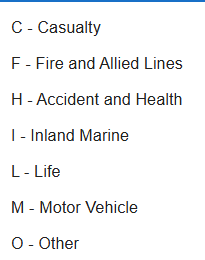
- LineOfBusiness – The original Line of Insurance business code provided in your web call. Refer to the following for the code that should be used:
- MatchedAddress –An address returned from the address database, if a match to your source address can be found.
- Street
- City
- State
- ZipCode
If an address was not returned, it is due to the following reasons:
- The address is a PO Box, Rural Route, or Highway Contract Route.
- A similar address could not be found. Either the address is invalid or a similar address could not be found in the database.
- CensusBlockID – The Census Block ID of the MatchedAddress contains relevant US Census information.
- CountyFIPSCode – The county FIPS code is derived from the CensusBlockID. The first 2 digits identify the state jurisdiction and the last 3 digits identify the county jurisdiction of the MatchedAddress.
- CensusCountyName – The county of the MatchedAddress is determined by plotting address coordinates to a Kentucky map. CensusCountyName is always returned; it does not indicate that the county taxes the policy.
- CensusCountyCode – If CensusCountyName has a corresponding tax code in the KY Annual Insurance Bulletin, it will be returned. This does not indicate the county taxes the policy. If there is no tax code, the number 9998 will be returned.
- MatchQuality – In order for a MatchedAddress to be returned, MatchQuality must be rated as a Good Match (match code 0). Precisely’s geocoding engine uses its own algorithm to determine what a good match is. The street or house number of a MatchedAddress must be identical to the number in the SourceAddress to be considered a close match. Other elements of the address are evaluated to determine if the MatchedAddress is a good candidate for the SourceAddress provided.
- Good Match. A good matching address was returned.
- No Close Match. An address closely corresponding to the source address was not found. No MatchedAddress will be returned.
- PO Box or Rural Route. The SourceAddress or MatchedAddress was determined to be a PO Box, Rural Route, or HC Route. No MatchedAddress will be returned.
- MatchCode
- 0 indicates a good match.
- 3 indicates no close match.
- 4 indicates a PO Box, RR, or HC Route.
- MatchIdentifier –Indicates which parts of a MatchedAddress are an exact match to its SourceAddress. The MatchIdentifier contains 10 characters that represent different parts of the address. If Agent is able to match part of an address, a character will appear in the match identifier at the position corresponding to that part of the address. If not, a dash will appear instead. The MatchIdentifier positions are as follows:
Geocode Type
The first character in the MatchIdentifier is always: S – Street Type
Positional Accuracy
The second character indicates the positional accuracy of the coordinates tied to the Match Address. The match return is either based on coordinates tied to the address, street, or zip code.
Number | Positional Accuracy |
8 | A single point represents the address |
7 | Interpolated points along a street segment/parcel |
6 | Centroid of a site or building with a dedicated zip code |
5 | Interpolated points along a street segment |
4 | Street centroid |
3 | ZIP + 4 centroid |
2 | ZIP + 2 centroid |
1 | ZIP centroid |
0 | No coordinates available |
Address Position
These positions describe the matches in the different elements in the address.
Position | Letter Code | Address Position |
1 | H | House Number |
2 | P | Street Prefix |
3 | N | Street Name |
4 | T | Street Type |
5 | S | Street Suffix |
6 | C | City Name |
7 | Z | Zip Code |
Example: The MatchIdentifier S5HPN-S-Z is interpreted as follows:
- The point is a street type known as an interpolated street segment.
- The house number, street prefix, street name, street suffix and zip code of the MatchedAddress are identical to the SourceAddress.
- The street type and city name in the MatchedAddress are not identical to the SourceAddress. This could be due to spelling or it may be completely different.
- CityCode –This corresponds to the City Code that appears on the KY Dept of Insurance Local Government Premium Tax Schedule. When a MatchedAddress is returned, Agent plots coordinates to a map to determine the taxing jurisdiction.
- If the address falls within the boundaries of a city that taxes policies, the CityCode for the city is returned.
- If the address falls outside a city that taxes or inside a city that does not tax, the address is assigned to the county. The county CityCode is returned.
- If a CityCode is not returned in the above 2 steps; a code of 9998 will be returned. This indicates that the policy is not taxable.
- CityName –The name of the city or county corresponding to the CityCode will be returned. CityName may or may not match the city found in the MatchedAddress. This is the actual physical location, not the name listed in the physical address. The word “NONTAXABLE” will be returned if a CityCode of 9998 is returned.
- CityOrCounty – If the CityCode and CityName returned are for a city, the word City will be returned. If the code and name are for a county, the word County will be returned. If the policy is nontaxable, nothing will be returned.
- TaxCode –TaxCode is returned for any municipality or county that has one. It is listed on Kentucky Local Government Premium Tax Schedule and the Local Government Premium Tax Code Descriptions. The maximum length for this element is 10.
- CityTaxRates – The tax rates for each line of business will be returned for the CityCode. If the CityCode is 9998, a tax rate of 0 will be returned. These rates are from the Kentucky Local Government Premium Tax Schedule.
- CountyCreditApplies – If premiums taxable by a city are also taxable by a county, true will be returned. Otherwise false will be returned. This applies to cities with a TaxCode of A or B.
- CountyCode – If CountyCreditApplies is true, the county’s CityCode will be returned.
- CountyName – If CountyCreditApplies is true, the county’s CityName will be returned.
- CountyTaxRates – If CountyCreditApplies is true, the county’s CityTaxRates will be returned.
- Casualty
- Fire
- Health
- Inland Marine
- Life
- Motor Vehicle
- Other
- MinTax Minimum Tax will be returned if applicable.
- FlatFee A flat fee will be returned if applicable.
- EffectiveDate – Returns the EffectiveDate you entered. Otherwise, the date is the current date. Tax rates returned are from this period.
- EffectiveTaxRate – An EffectiveTaxRate is returned for the LineOfBusiness you specified. If you do not specify a LineOfBusiness, the EffectiveTaxRate is zero. The EffectiveTaxRate rate may be multiplied by the premium amount to determine the total tax amount to be passed to the insured.
- If CountyCreditApplies is false, the EffectiveTaxRate is pulled from CityTaxRates
- If CountyCreditApplies is true, the EffectiveTaxRate is pulled from CityTaxRates or CountyTaxRates (whichever is higher).
- If CountyCreditApplies is true, but the city name is Springfield, Hickman, or Lawrenceburg, the effective tax rate will be the sum of the CityTaxRates and CountyTaxRates.
- EffectiveCityRate – The EffectiveCityRate is returned for the LineOfBusiness you specified. This is pulled from CityTaxRates. The EffectiveCityRate can be applied to premiums to determine the tax payable to the city or county.
- If CountyCreditApplies is false, the EffectiveCityRate is the same as the EffectiveTaxRate. It may be multiplied by premiums to determine
- If CountyCreditApplies is true, the EffectiveCityRate is the same as the CityTaxRates.
- EffectiveCountyRate – This is the EffectiveTaxRate less the EffectiveCityRate. The EffectiveCountyRate can be applied to premiums to determine the tax due to the county ONLY when both the county and city tax the same premiums.
- ErrorDetails –
- If no error occurs, Description remains blank and Number returned is 0.
- Error Description and Number for errors are:
- Geocoder Server error, 1000
- No CompanyID was specified, 1601
- No Password was specified, 1602
- Invalid CompanyID, 1603
- Incorrect Password, 1604
- Account suspended, 1605
- Tax rate not available for this date, 1606
- Incorrect Premium Type Code, 16071
- Premium Type Code Missing, 16072
- Unspecified Error, 1600
- Error Description and Number for errors are: